

The team leaderboard
Rank your team by card views, filter by month and download the leaderboard as an Excel file.
PlansProPremiumCompare plans
ForAdmins
On this page
The leaderboard ranks everyone in your organisation by how many times their card has been viewed. It’s a quick way to see who’s sharing their card most.
Before you start
- You need to be an admin.
- Your organisation needs the Pro or Premium plan.
Top Viewed Users
On your organisation analytics page (Analytics > My Company’s Views), the Top Viewed Users panel shows the five team members with the most views. It follows the Week, Month or Year you choose at the top of the page.
Open the full leaderboard
- Open Analytics and click My Company’s Views.
- In Top Viewed Users, click View All.
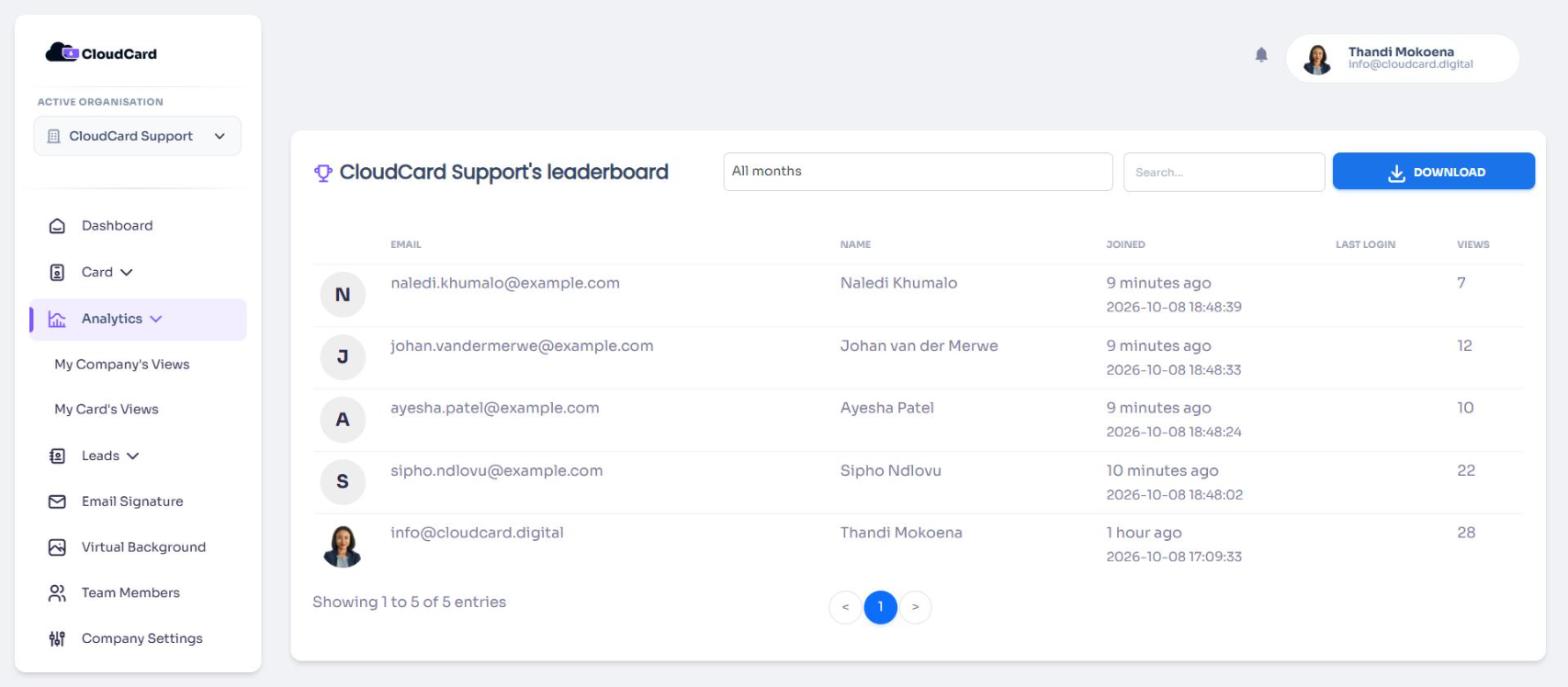
The page is headed with your organisation’s name and “leaderboard”. Each row shows Email, Name, Joined, Last login and Views, sorted by most views first.
Filter by month
The full leaderboard counts all views since your organisation started. To see one month, choose it from the filter at the top. Choose All months to go back to the total.
Download the leaderboard
Click Download. An Excel file named after your organisation, ending in -leaderboard.xlsx, downloads.
Related
Was this article helpful?
Thanks for letting us know.
Still stuck?
Send us a message and we'll know which article you were reading. Or email [email protected].