

Share your card link
Find your card's link, copy it, or send it straight from your phone by WhatsApp, email or text.
ForCardholders
On this page
Your card has its own web link. Anyone who opens it sees your card in their browser, with no app needed. You can paste it anywhere: emails, WhatsApp, LinkedIn, your website or a text message.
Your link looks like this:
https://app.cloudcard.co.za/your-company/your-name
It stays the same even if you change your name, job title or other details, so you can share it with confidence.
Copy your link from the dashboard
- Sign in and go to your Dashboard.
- Find the Your Digital Business Card panel.
- Click your card link, or the copy icon next to it.
You’ll see Copied to clipboard. Paste the link wherever you need it.
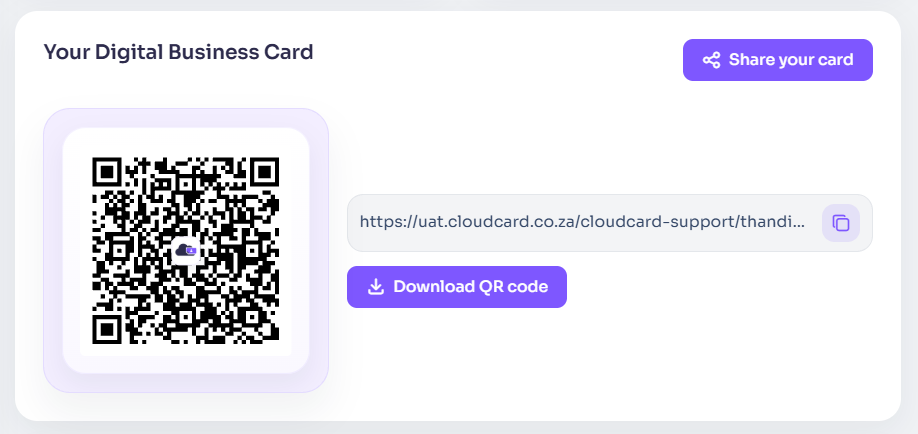
Send it from your phone
- On the dashboard, tap Share your card in the Your Digital Business Card panel.
- Your phone’s share menu opens. Choose the app you want to use, such as WhatsApp, Mail or Messages.
- Pick the person and send.
If your browser doesn’t have a share menu (most computers don’t), Share your card copies the link instead and shows Share link copied to clipboard.
Share from your card itself
Open your card and tap the share icon at the bottom of the card. Your phone’s share menu opens with your link ready to send. The icon only appears on phones and browsers that support sharing.
Related
Was this article helpful?
Thanks for letting us know.
Still stuck?
Send us a message and we'll know which article you were reading. Or email [email protected].