

Add line items and quotes
Build a deal's value from line items with quantities, prices and discounts, and see the subtotal, VAT and total.
PlansProPremiumCompare plans
A deal’s value is the sum of its line items. You don’t type a total in. You list what you’re quoting, and CloudCard works out the subtotal, VAT and total. The finished quote shows on the lead’s Deals tab.
Add line items
- Open the lead and, on the Deals tab, click New deal, or Edit on an existing deal.
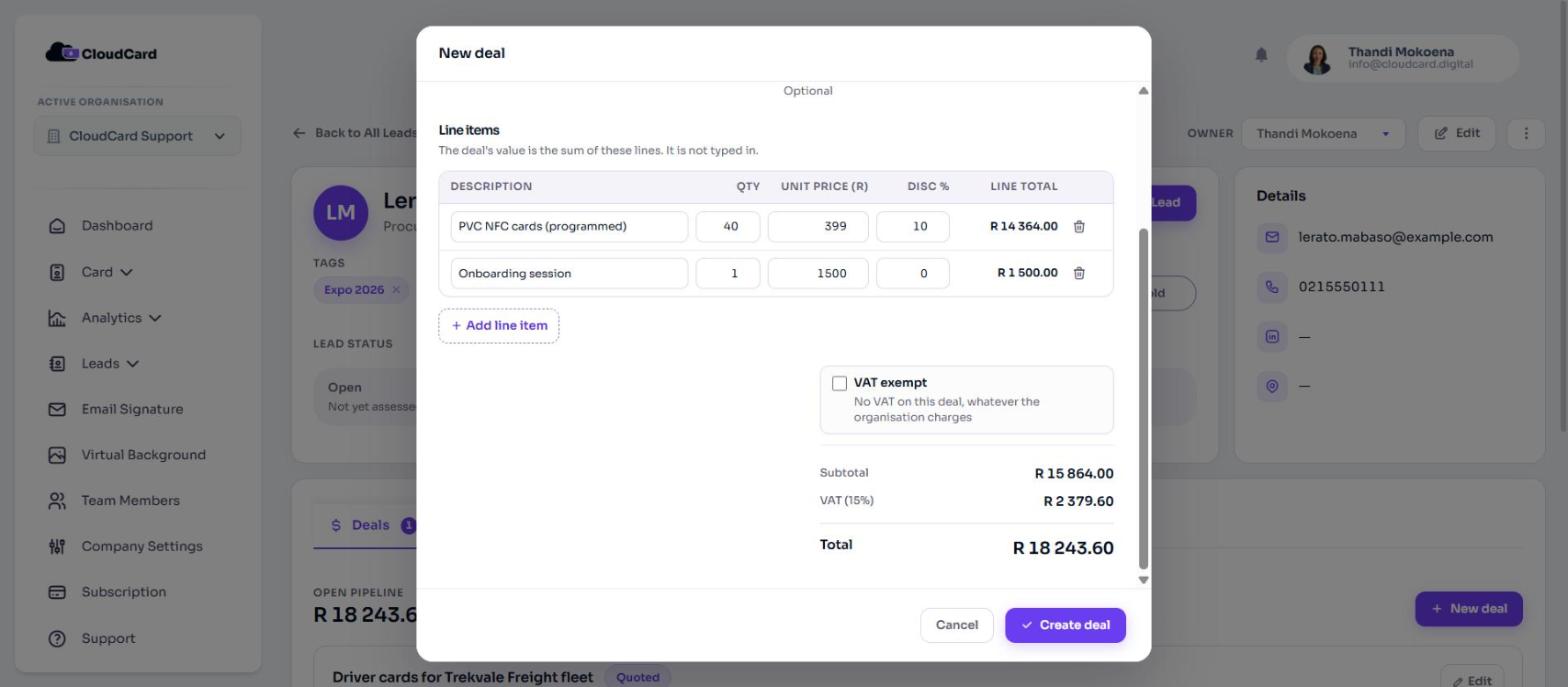
- Under Line items, fill in the first line:
- Description: the item or service.
- Qty: how many. Decimals are allowed.
- Unit price: the price for one, in your organisation’s currency.
- Disc %: an optional discount for this line.
- Line total updates as you type.
- Click Add line item for another line. Click the remove button at the end of a line to delete it.
- Click Create deal or Save deal.
Lines without a description aren’t saved. A deal can have up to 50 lines.
Totals and VAT
Below the lines you’ll see:
- Subtotal: the sum of the line totals.
- VAT: shown with the rate, for example “VAT (15%)”, when your organisation charges VAT.
- Total.
If this deal shouldn’t carry VAT, tick VAT exempt (“No VAT on this deal, whatever the organisation charges”). The VAT line then reads Exempt. The option only appears when your organisation charges VAT.
Where the quote shows
On the lead’s Deals tab, each deal shows its stage, close date and a table of Item, Qty, Unit, Disc and Total, followed by the subtotal, VAT and total. The deal’s total also shows on its card on the Deals board.
Related
Was this article helpful?
Thanks for letting us know.
Still stuck?
Send us a message and we'll know which article you were reading. Or email [email protected].