

Export leads to Excel
Download your leads, with their deals, activities, tasks and notes, as an Excel workbook that matches your current filters.
PlansProPremiumCompare plans
You can download your leads as an Excel (.xlsx) workbook, for reporting or to import into another system.
What you can export
- On View My Leads, the export contains the leads you own.
- On View All Leads (admins), the export contains every lead in the organisation.
Steps
- Open View My Leads or View All Leads.
- Optional: click Filter, choose the leads you want and click Apply. The export includes only the filtered leads.
- Click Export at the top of the page.
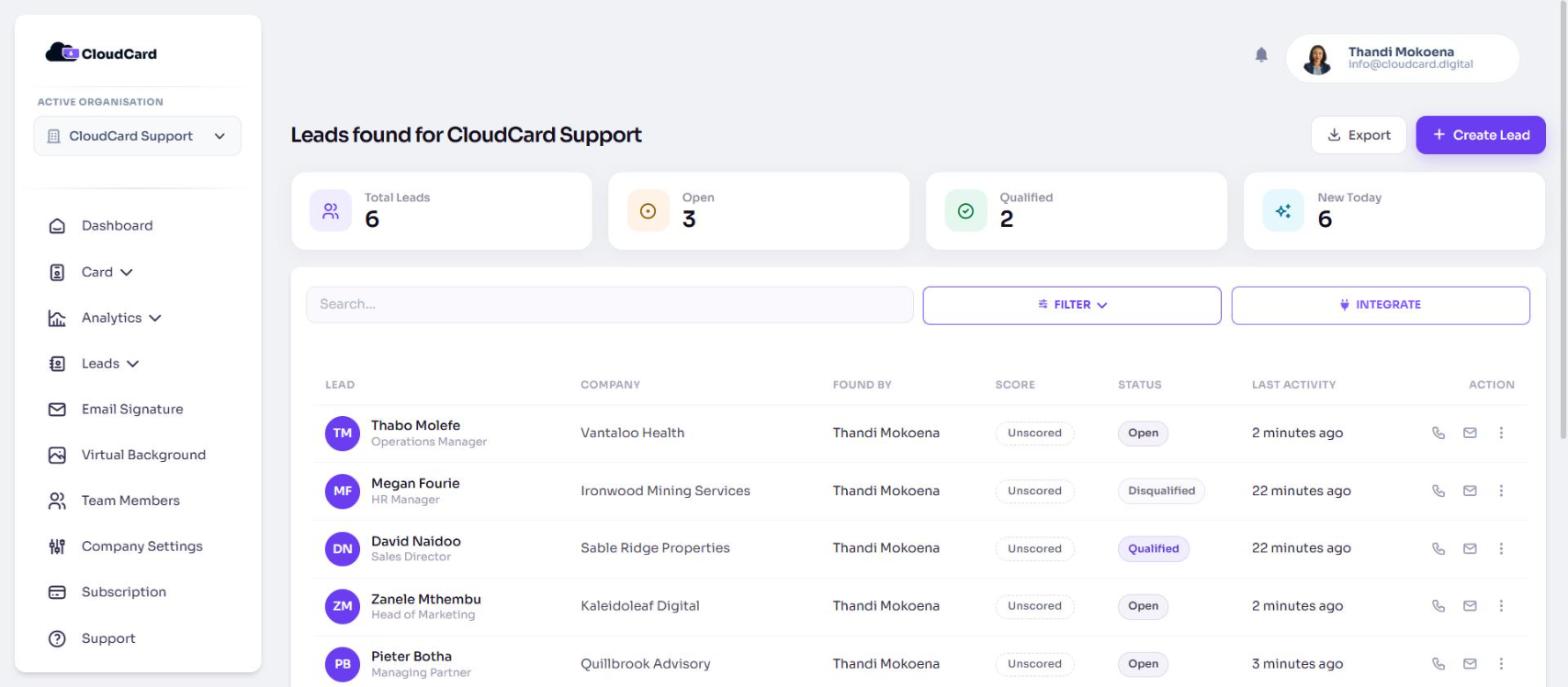
The file downloads straight away. It’s called my_leads.xlsx or organisation_leads.xlsx. When filters are on, a short description of them is added to the name, so you can tell exports apart.
What’s in the workbook
| Sheet | Contents |
|---|---|
| Export Summary | When the export was made, which filters were applied, and how many rows each sheet has |
| Leads | One row per lead |
| Deals | Deals on those leads |
| Line Items | The line items on those deals |
| Activities | Logged calls, emails, meetings and notes |
| Open Tasks | Tasks that aren’t finished yet |
| Notes | Notes on those leads |
Related
Was this article helpful?
Thanks for letting us know.
Still stuck?
Send us a message and we'll know which article you were reading. Or email [email protected].