

Set deal currency and VAT
Choose the currency your organisation quotes in and whether deals charge VAT, and at what rate.
PlansProPremiumCompare plans
ForAdmins
Deal settings decide the currency and VAT for your organisation’s deals. There’s one currency for the whole organisation, so the deals board can add everything up into one figure.
Before you start
- You need to be an admin of the organisation.
Steps
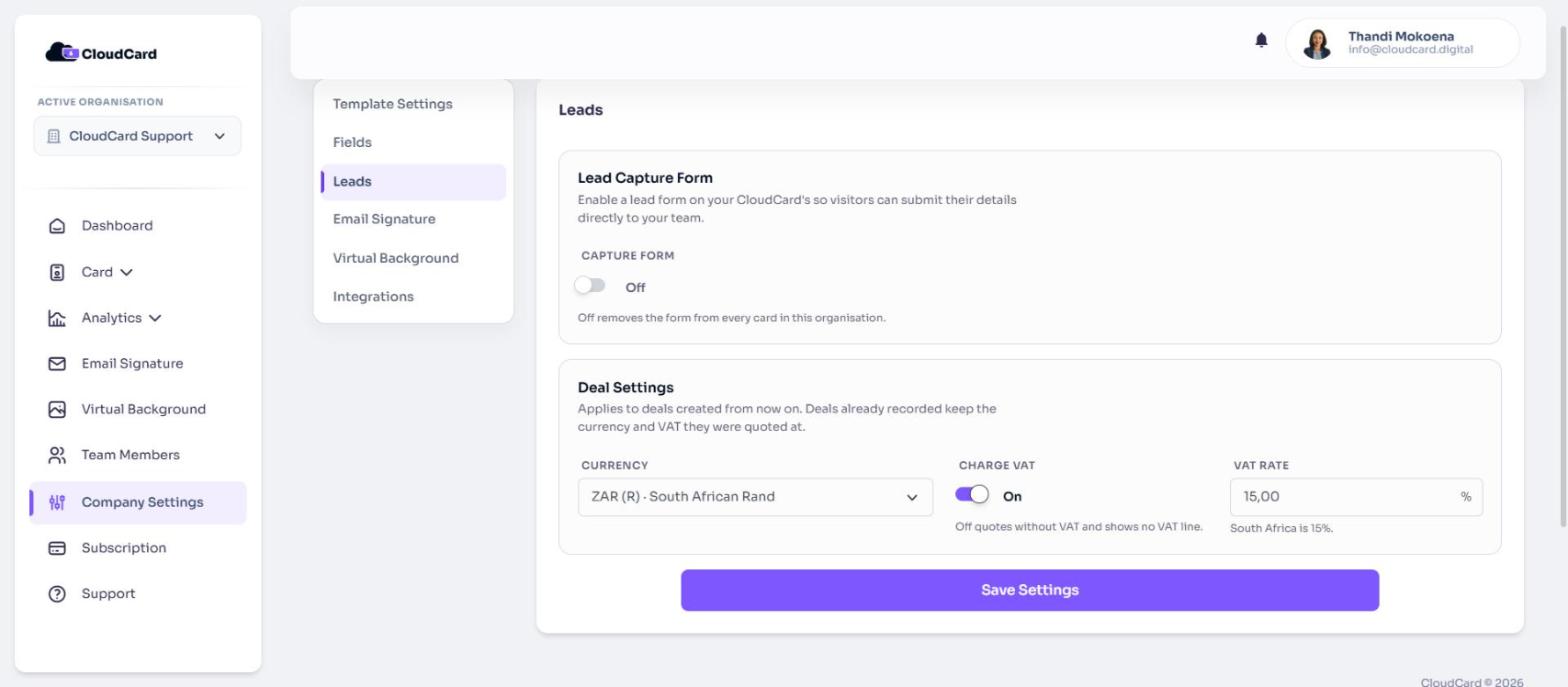
- In the left menu, click Company Settings.
- Click the Leads tab.
- Under Deal Settings, choose a Currency:
- ZAR (R) South African Rand (the default)
- USD ($) US Dollar
- GBP (£) British Pound
- EUR (€) Euro
- Turn Charge VAT on or off. When it’s off, quotes have no VAT line.
- If VAT is on, enter the VAT rate as a percentage. It starts at 15%, South Africa’s rate.
- Click Save Settings.
When changes take effect
As the card says: “Applies to deals created from now on. Deals already recorded keep the currency and VAT they were quoted at.”
- Switching currency doesn’t convert existing deals. CloudCard doesn’t use exchange rates.
- If you turn Charge VAT off, the rate you entered is kept, ready for when you turn it back on.
Related
Was this article helpful?
Thanks for letting us know.
Still stuck?
Send us a message and we'll know which article you were reading. Or email [email protected].